
Launching a WordPress website should be an exciting milestone for both agencies and clients. However, it often becomes one of the most stressful stages of a project. A website may look perfect during development, but problems can appear as soon as it goes live.
Many agencies have faced situations where contact forms stop working, plugins conflict with each other, important redirects are missing, or SEO settings are not configured properly. These issues can affect user experience, lead generation, and search engine rankings. More importantly, they can result in unhappy clients and last-minute troubleshooting that puts pressure on the entire team.
The challenge is that website launches are often handled differently from one project to another. Without a clear process, small mistakes can easily slip through the cracks. As agencies take on more clients and projects, these issues can become more frequent and costly.
This is why having a repeatable WordPress deployment workflow is so important. A structured process helps teams move websites from development to live environments with greater confidence, consistency, and fewer surprises.
Today, automation and AI are making deployments even more efficient. From automated testing and monitoring to workflow management and client communication, agencies can reduce manual work, catch issues earlier, and deliver smoother website launches.
In this guide, we’ll walk through a practical WordPress deployment workflow that agencies can use to launch websites faster, safer, and with fewer headaches.
Key Takeaways
- A structured WordPress deployment workflow helps reduce launch-day errors and unexpected issues.
- Common deployment problems include broken forms, plugin conflicts, missing redirects, and SEO mistakes.
- Building locally and testing in a staging environment can prevent many production issues.
- A detailed quality assurance process ensures websites function properly before launch.
- Backups and rollback plans are essential for minimizing deployment risks.
- Post-launch monitoring helps identify and fix issues quickly.
- Automation and AI can streamline testing, documentation, monitoring, and workflow management.
- Agencies that follow a consistent deployment process can deliver projects faster and improve client satisfaction.
What Is a WordPress Deployment Workflow?
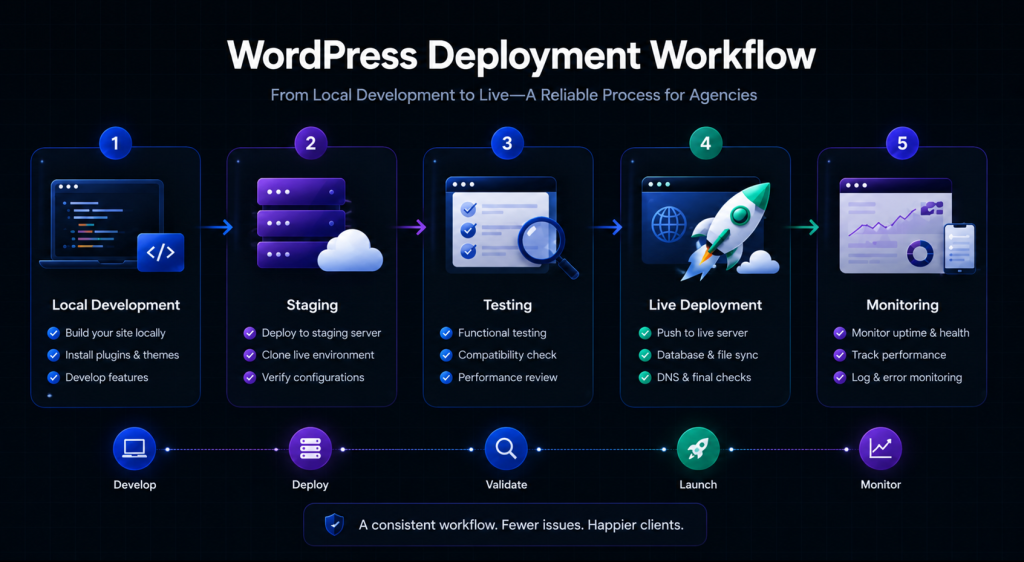
A WordPress deployment workflow is the process of moving a website from the development stage to a live production environment where visitors can access it. The goal is to launch the website smoothly while reducing the chances of errors, downtime, or unexpected issues.
Many people think deployment simply means clicking the “Publish” button and making a website live. In reality, there is much more involved. Before a website is launched, it needs to be tested, reviewed, and validated to ensure everything works as expected.
It’s also important to understand the difference between development and deployment.
Development is the stage where designers and developers build the website, create pages, install plugins, add content, and make changes. This work usually takes place in a local or staging environment where updates can be made safely.
Deployment is the process of taking that completed work and moving it to the live website. During this stage, teams need to ensure that forms are working, integrations are connected properly, SEO settings are configured correctly, and the website performs well in a real-world environment.
Without a clear deployment workflow, small issues can easily go unnoticed until after launch. A broken contact form, a missing redirect, or a plugin conflict may not seem like a major problem, but they can affect user experience, lead generation, and search rankings.
A structured deployment workflow helps agencies avoid these risks by creating a consistent process for testing, launching, and monitoring websites. Instead of relying on last-minute checks, teams can follow a proven system that makes website launches more predictable and efficient.
Why Agencies Struggle with WordPress Deployments

WordPress is one of the most popular website platforms in the world, but launching a website successfully requires more than just good design and development. Many agencies run into deployment issues because the process surrounding the launch is often inconsistent or rushed.
As agencies handle multiple projects at the same time, even small mistakes can lead to delays, extra work, and unhappy clients. Understanding the most common deployment challenges is the first step toward building a more reliable workflow.
Lack of Standardized Processes
One of the biggest reasons deployments go wrong is the absence of a standard process.
In many agencies, different team members have their own way of handling website launches. One developer may follow a detailed checklist, while another may rely on memory. Some projects might go through a staging environment, while others are pushed directly to production.
When there is no documented workflow, important steps can easily be missed. This creates inconsistencies across projects and increases the chances of errors during deployment.
Testing Directly on Live Sites
Testing changes on a live website is a common but risky practice.
While it may seem like a quick way to save time, it can create problems for both visitors and clients. Changes made directly on a production site can break functionality, affect user experience, or even cause temporary downtime.
For example, updating a plugin or modifying website settings on a live site could unexpectedly impact forms, layouts, payment gateways, or other critical features. If something goes wrong, visitors may experience issues before the agency has a chance to fix them.
A staging environment provides a safer space to test changes before they reach the public.
Plugin Compatibility Issues
Plugins are one of the main reasons WordPress is so flexible, but they can also become a source of deployment problems.
A website may work perfectly during development, only to experience issues after launch because of a plugin conflict. Sometimes a plugin update introduces changes that are incompatible with another plugin, the active theme, or the hosting environment.
These conflicts can lead to broken functionality, slow performance, or website errors. This is why plugin testing should always be part of the deployment process rather than something handled after launch.
Poor Communication Between Teams
Website deployments involve more than developers alone.
Designers, developers, project managers, content teams, and clients all play a role in preparing a website for launch. When communication breaks down between these groups, important details can be overlooked.
For example:
- Designers may make changes that developers are unaware of.
- Project managers may approve updates that have not been tested.
- Clients may request changes that are not communicated to the technical team.
- Content updates may be added after testing is complete.
Without clear communication, teams can find themselves working with outdated information, which increases the risk of launch-day issues.
Last-Minute Changes Before Launch
Many deployment problems happen because of changes requested at the last minute.
A client may want a new section added, a plugin installed, or content updated just hours before the website goes live. While these requests often seem small, they can introduce unexpected problems.
Even a minor change can affect layouts, forms, integrations, or website performance. Since these updates are made close to launch, there is often limited time available for proper testing.
The closer changes are made to deployment, the greater the risk of introducing instability into the project. That’s why successful agencies establish clear launch deadlines and avoid unnecessary modifications during the final stages of deployment.
The Ideal WordPress Deployment Workflow for Agencies
A successful website launch doesn’t happen by accident. It follows a structured process that helps agencies reduce risks, catch issues early, and deliver a better experience for clients.
Below is a proven WordPress deployment workflow that agencies can follow to move projects from development to production with confidence.

Step 1: Build in a Local Development Environment
The best place to start any WordPress project is in a local development environment.
A local environment allows developers to build and test websites on their own computers before making them available online. This creates a safe space for development without affecting the live website or client-facing environments.
Popular local development tools include:
- LocalWP
- Docker
- DevKinsta
Using a local environment offers several advantages:
- Faster development and testing
- Safe experimentation with themes and plugins
- No risk of breaking a live website
- Easier debugging and troubleshooting
- Better control over development workflows
By building locally first, agencies can establish a stable foundation before moving the website to the next stage.
Step 2: Push to a Staging Environment
Once development is complete, the website should be moved to a staging environment.
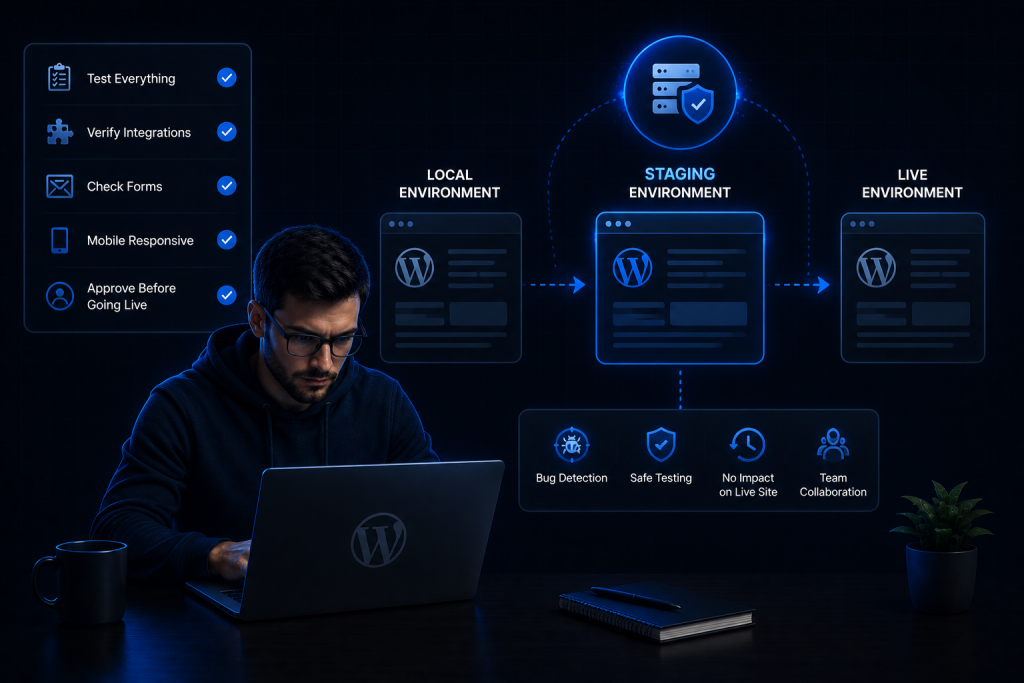
A staging environment is a private copy of the website that closely matches the live server. It allows teams to test the website under conditions that are similar to production without exposing unfinished changes to visitors.
Unfortunately, many agencies skip this step when deadlines are tight. This often leads to problems being discovered after launch instead of before.
Every agency should use a staging environment because it helps identify issues in a safe environment before they affect real users.
Before moving forward, review the following staging checklist:
Staging Environment Checklist
- Test all contact forms and lead capture forms
- Verify third-party integrations
- Check user registration and login functionality
- Review mobile responsiveness across devices
- Test payment gateways and checkout processes
- Confirm email notifications are working correctly
The more issues discovered during staging, the fewer surprises there will be after launch.

Step 3: Conduct Comprehensive QA Testing
Quality assurance testing is one of the most important parts of the deployment process.
Many teams focus only on how the website looks, but visual checks alone are not enough. A complete QA process should verify functionality, SEO settings, performance, and security.
Functional Testing
Make sure all key website functions work correctly:
- Contact forms
- Booking forms
- Newsletter signups
- User registration
- Checkout and payment processes
SEO Testing
Verify important SEO elements before launch:
- Meta titles and descriptions
- XML sitemap generation
- Redirect setup
- Canonical tags
- Search engine indexing settings
Performance Testing
Evaluate website speed and performance:
- Page load times
- Core Web Vitals
- Image optimization
- Caching functionality
Security Testing
Review basic security requirements:
- SSL certificate installation
- User roles and permissions
- Login security settings
- Security plugin functionality
A thorough QA process helps prevent costly issues from reaching production.
Step 4: Prepare for Production Deployment
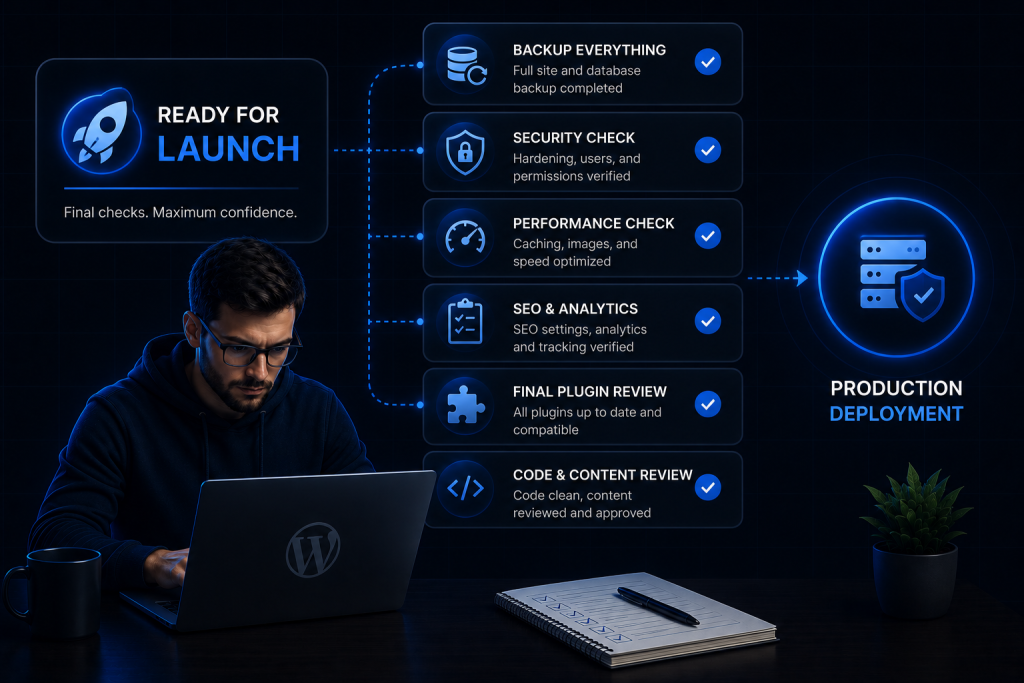
Before launching the website, agencies should complete a final review and preparation process.
This step acts as a safety net and ensures everything is ready before making the site live.
Pre-Launch Checklist
- Create a full website backup
- Create a separate database backup
- Review installed plugins
- Verify DNS settings
- Confirm analytics tracking is working
- Check website URLs and environment settings
- Review forms and integrations one final time
Spending a few extra minutes on preparation can save hours of troubleshooting later.
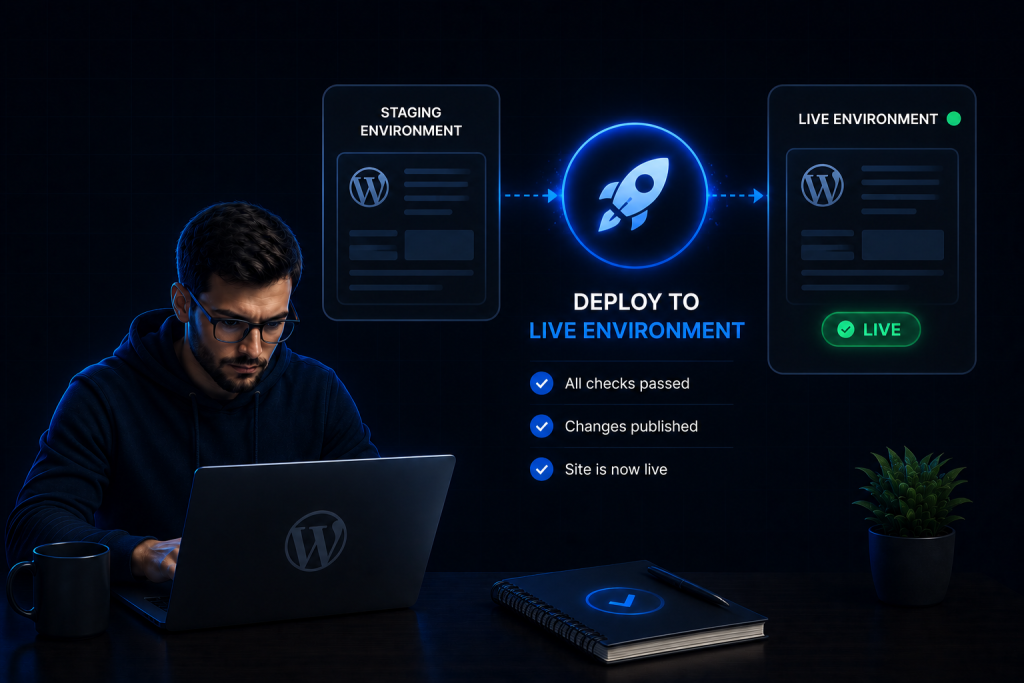
Step 5: Deploy to the Live Environment
After testing and preparation are complete, it’s time to launch the website.
The deployment itself should be controlled and carefully planned rather than rushed at the last minute.
Some deployment best practices include:
- Schedule deployments during lower-traffic periods
- Avoid making additional changes during deployment
- Follow a documented deployment process
- Keep backups readily available
- Assign team members clear responsibilities
Once the deployment is complete, perform immediate post-launch validation.
Check that:
- The website loads correctly
- Forms are working
- Tracking codes are active
- Integrations are functioning properly
- Key pages display correctly
The goal is to verify that the live environment matches what was tested in staging.
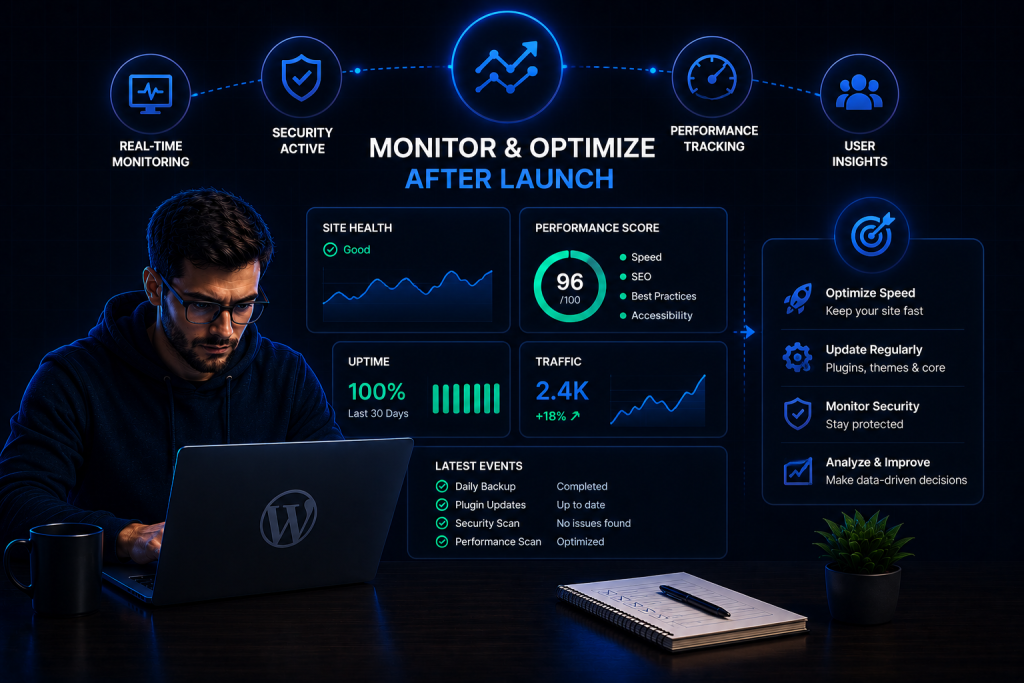
Step 6: Monitor and Optimize After Launch
A deployment is not truly finished once the website goes live.
The first few hours and days after launch are critical because real users may uncover issues that were not identified during testing.
Agencies should actively monitor:
- Website uptime
- Form submissions
- CRM integrations
- Lead generation systems
- Website speed and performance
- Error logs
- User feedback
Ongoing monitoring allows teams to respond quickly if issues arise and ensures the website continues to perform as expected.
The most successful agencies treat deployment as an ongoing process rather than a one-time event. Continuous monitoring and optimization help maintain website stability, improve performance, and provide a better experience for both clients and visitors.
WordPress Deployment Checklist for Agencies
Even with a well-planned deployment process, it’s easy to overlook important details during a busy launch. That’s why every agency should use a deployment checklist.
A checklist helps ensure that critical tasks are completed before, during, and after launch. It also creates consistency across projects, reduces human error, and gives teams confidence that nothing important has been missed.
Use the checklist below as a final review before launching a WordPress website.
Development Checklist
Before moving the website to staging or production, confirm that all development work has been completed.
- Website build completed
- All pages and templates finalized
- Content uploaded and reviewed
- Images optimized
- Plugin installation completed
- Plugin review and compatibility checks completed
- Theme customization finalized
- Custom functionality tested
Testing Checklist
Thorough testing helps identify issues before they impact visitors.
- Mobile responsiveness tested
- Contact forms tested
- Lead generation forms tested
- Login and registration tested
- Browser compatibility tested
- Navigation and internal links verified
- Payment gateways tested (if applicable)
- SEO settings reviewed and verified
- Redirects configured correctly
- XML sitemap generated and validated
- Website speed tested
Launch Checklist
Before making the website live, complete these final checks.
- Full website backup created
- Database backup completed
- DNS settings reviewed
- SSL certificate active
- Production environment settings verified
- Tracking codes installed
- Analytics setup verified
- Cache cleared and configured properly
- Final client approval received
Post-Launch Checklist
Once the website is live, continue monitoring and validating performance.
- Analytics tracking working correctly
- CRM integrations connected
- Lead forms successfully submitting data
- Automated workflows functioning properly
- Website uptime monitored
- Search engine indexing verified
- Error logs reviewed
- Website speed checked on production
- Client notified of successful launch
- Ongoing monitoring plan established
Following a deployment checklist may seem simple, but it is one of the most effective ways to reduce launch-day issues and create a smoother experience for both agencies and clients.
How AI Is Transforming WordPress Deployment Workflows
Website deployment has traditionally been a manual process that relies heavily on checklists, testing, documentation, and team coordination. While these processes are still important, AI is helping agencies streamline many of these tasks and reduce the chances of human error.
Instead of spending hours on repetitive checks and administrative work, teams can use AI-powered tools and automation to improve accuracy, save time, and make deployments more predictable.
At HighLevel AI Automation, we are seeing more agencies adopt AI-driven workflows to simplify website launches and improve operational efficiency.
AI-Powered QA Validation
Quality assurance is one of the most time-consuming parts of a deployment. AI can help by automating many routine testing and validation tasks.
Benefits of AI-assisted QA include:
- Automated testing reports
- Detection of broken links and pages
- Identification of missing SEO elements
- Monitoring form functionality
- Faster issue reporting and troubleshooting
Rather than relying entirely on manual testing, teams can use AI to identify potential problems before they reach production.
AI Deployment Documentation
Documentation is often overlooked during website launches, especially when teams are working under tight deadlines.
AI can automatically generate deployment records and documentation that help agencies maintain consistency across projects.
Examples include:
- Deployment summaries
- Change logs
- Task completion reports
- Internal project documentation
- Client-facing deployment reports
Having accurate documentation makes future updates and troubleshooting much easier.
AI Monitoring
Some deployment issues only become visible after a website goes live. This is where AI-powered monitoring can provide additional protection.
AI systems can continuously monitor websites and alert teams when issues are detected.
Examples include:
- Detecting broken pages
- Monitoring form submissions
- Identifying failed integrations
- Tracking website performance issues
- Detecting unusual activity or errors
Instead of waiting for clients or visitors to report problems, agencies can proactively address issues before they become major concerns.
AI Workflow Automation
Website deployments involve multiple stakeholders, including developers, designers, project managers, and clients.
AI and automation can help coordinate these activities by reducing manual communication and administrative tasks.
Common workflow automations include:
- Launch notifications
- Client approval workflows
- Task assignment automation
- Internal team alerts
- Automated status updates
These automations help teams stay aligned while reducing delays caused by missed communication.
As AI technology continues to evolve, agencies that combine structured deployment processes with intelligent automation will be better positioned to deliver faster, more reliable website launches.
Integrating WordPress with HighLevel for Smarter Launches
Launching a website is only part of the process. Once the website is live, it should actively support lead generation, customer communication, and business growth.
This is where integrating WordPress with HighLevel can create a more connected and efficient system.
Rather than treating the website and CRM as separate tools, agencies can connect them to automate lead management and customer follow-up from day one.
Lead Capture Forms
When a visitor submits a contact form on a WordPress website, the information can automatically be sent to HighLevel.
This eliminates manual data entry and ensures that every lead is captured immediately.
CRM Automation
Once a lead enters the system, HighLevel can automatically create a contact record, assign tags, and trigger predefined workflows.
This helps agencies and businesses respond faster while maintaining organized customer data.
Pipeline Automation
New leads can be automatically placed into the appropriate sales pipeline stage based on their actions or form submissions.
This gives sales teams greater visibility into opportunities without requiring manual updates.
Appointment Booking
Businesses can integrate booking calendars directly into WordPress websites, allowing visitors to schedule consultations, demos, or appointments without additional back-and-forth communication.
Appointment details are automatically synchronized with HighLevel workflows.
Email Sequences
After a lead is captured, automated email sequences can begin instantly.
These emails can provide information, nurture prospects, deliver resources, or encourage prospects to take the next step.
SMS Follow-Ups
In addition to email automation, HighLevel can trigger SMS messages to engage leads quickly.
This helps businesses improve response rates and stay connected with prospects throughout the customer journey.
Example Workflow
A simple automated workflow might look like this:
Visitor submits a form on the WordPress website → Lead is sent to HighLevel → Contact is created automatically → Pipeline stage is assigned → Automated email sequence begins → SMS follow-up is triggered → Sales team receives notification
With the right integrations in place, a website becomes more than just an online presence. It becomes a fully connected lead generation and customer management system.
For agencies managing multiple client websites, combining WordPress with HighLevel automation can reduce manual work, improve lead response times, and create a more streamlined experience for both businesses and their customers.
Common WordPress Deployment Mistakes to Avoid
Even agencies with experienced teams can run into deployment problems. Most issues are not caused by WordPress itself but by small mistakes made during the launch process.
The good news is that many of these problems are completely avoidable when agencies follow a structured deployment workflow.
Mistake 1: Skipping Staging
One of the most common deployment mistakes is launching a website without first testing it in a staging environment.
Staging allows teams to identify issues before they reach the live website. Without it, agencies are essentially testing changes in front of real users.
Skipping staging can lead to:
- Broken functionality
- Design issues
- Integration failures
- Unexpected plugin conflicts
A staging environment acts as a safety layer that helps catch problems before launch.
Mistake 2: Deploying Without Backups
No deployment should happen without a complete backup strategy.
Even well-tested websites can experience unexpected issues during launch. Without backups, recovering from a failed deployment can be time-consuming and costly.
Before every launch, agencies should create:
- A full website backup
- A database backup
- A backup of critical configuration files
Having backups ensures the website can be restored quickly if something goes wrong.
Mistake 3: Ignoring SEO Validation
Many agencies focus heavily on design and functionality but overlook SEO checks during deployment.
Small SEO mistakes can impact search visibility and traffic after launch.
Common issues include:
- Missing meta titles and descriptions
- Broken redirects
- Incorrect indexing settings
- Missing XML sitemaps
- Broken internal links
SEO validation should always be part of the deployment checklist.
Mistake 4: Updating Plugins Right Before Launch
Installing or updating plugins shortly before deployment can introduce unnecessary risk.
A plugin update may change functionality, create compatibility issues, or affect performance. If these changes are made right before launch, there may not be enough time for proper testing.
A better approach is to complete plugin updates earlier in the development process and thoroughly test them before deployment.
Mistake 5: Not Testing CRM Integrations
Many websites rely on CRM systems for lead capture and customer management.
If CRM integrations are not tested properly, businesses may lose valuable leads without realizing it.
Agencies should verify:
- Form submissions
- Contact creation
- Workflow triggers
- Email notifications
- Pipeline automation
Testing integrations is just as important as testing the website itself.
Mistake 6: No Rollback Strategy
Even with careful planning, deployments can occasionally fail.
Without a rollback plan, teams may struggle to recover quickly and restore website functionality.
A rollback strategy should clearly define:
- How backups will be restored
- Who is responsible for recovery
- What steps will be followed if deployment issues occur
The best deployment teams prepare for problems before they happen, not after.
Why Agencies Are Automating Website Deployment Processes
As agencies manage more clients and projects, manual deployment processes become harder to maintain.
What works for a few websites may become inefficient when teams are responsible for dozens of deployments every month. This is one of the main reasons agencies are increasingly investing in automation and AI-powered workflows.
Reduced Manual Work
Traditional deployments often involve repetitive tasks such as testing, reporting, documentation, approvals, and monitoring.
Automation helps reduce the amount of manual effort required while improving consistency across projects.
Teams spend less time on routine tasks and more time on strategic work.
Faster Launches
Automation allows agencies to move projects through the deployment process more efficiently.
Tasks such as notifications, quality checks, lead routing, and workflow management can happen automatically instead of requiring manual intervention.
As a result, websites can be launched faster without sacrificing quality.
Better Client Experience
Clients expect smooth launches and clear communication throughout the process.
Automated updates, approval workflows, and reporting systems help keep clients informed while reducing delays and confusion.
A more organized deployment process often leads to greater client satisfaction and stronger long-term relationships.
Lower Operational Costs
Manual processes consume valuable team resources.
By automating repetitive tasks, agencies can reduce operational overhead and improve overall productivity. This allows teams to handle more projects without significantly increasing workload or staffing requirements.
More Predictable Project Delivery
One of the biggest benefits of automation is consistency.
Automated workflows ensure that the same processes are followed every time, regardless of who is working on the project.
This creates more predictable timelines, fewer deployment errors, and better project outcomes.
The Growing Role of AI and Automation
The agency industry is rapidly embracing AI and automation to improve operational efficiency.
AI is helping agencies:
- Automate testing and quality assurance
- Monitor website performance
- Generate reports and documentation
- Manage client communications
- Streamline project workflows
While AI cannot replace good processes, it can significantly improve the speed, accuracy, and consistency of website deployments.
Agencies that combine proven deployment workflows with intelligent automation are often able to scale more efficiently while delivering better results for their clients.
How HighLevel AI Automation Helps Agencies Streamline Website Launches
At HighLevel AI Automation, we help agencies create connected systems that simplify website launches and improve post-launch operations.
Rather than treating deployment as a standalone technical task, we focus on building automated workflows that connect websites, CRM systems, lead management processes, and customer communication into a single ecosystem.
HighLevel CRM Setup
We help agencies configure HighLevel CRM environments that support lead tracking, sales processes, customer communication, and automation workflows.
This creates a centralized system for managing leads generated through WordPress websites.
WordPress-to-HighLevel Integration
Connecting WordPress with HighLevel allows businesses to automate lead capture and customer management.
We help agencies integrate:
- Contact forms
- Lead capture systems
- Appointment booking tools
- Customer databases
- Marketing workflows
This ensures that every lead is captured and routed correctly.
Workflow Automation
Manual tasks slow down project delivery and increase the likelihood of errors.
Our workflow automation solutions help agencies automate:
- Lead routing
- Internal notifications
- Client communications
- Appointment confirmations
- Follow-up sequences
This reduces administrative work while improving efficiency.
Lead Management Automation
Speed matters when responding to new leads.
We help businesses automatically:
- Capture leads
- Create contact records
- Assign pipeline stages
- Trigger follow-up campaigns
- Notify sales teams
This creates a faster and more consistent lead management process.
AI-Powered Business Processes
AI can help agencies and businesses automate repetitive tasks that consume valuable time.
Our AI-powered solutions can support:
- Automated responses
- Lead qualification
- Workflow management
- Reporting and documentation
- Customer engagement processes
These systems help businesses operate more efficiently while improving customer experiences.
Website Deployment Consulting
For agencies looking to improve their deployment workflows, we provide strategic guidance on:
- WordPress deployment processes
- CRM integration planning
- Automation implementation
- Website launch workflows
- Post-launch optimization
Our goal is to help agencies create repeatable systems that reduce deployment risks, improve efficiency, and support long-term growth.
By combining WordPress, HighLevel, AI, and automation, agencies can move beyond simple website launches and build scalable systems that generate measurable business results.
Conclusion
A successful WordPress deployment is about much more than making a website live. It requires careful planning, thorough testing, clear communication, and a structured workflow that minimizes risk at every stage. Agencies that follow a consistent deployment process can avoid common launch-day issues, improve project delivery, and create a better experience for their clients.
As websites become more connected with CRM platforms, marketing systems, and business automation tools, having a reliable deployment workflow becomes even more important. At the same time, AI and automation are helping agencies streamline testing, monitoring, documentation, and lead management, making deployments faster and more predictable.
By combining proven WordPress deployment best practices with smart automation solutions, agencies can reduce manual work, launch websites with greater confidence, and build scalable systems that support long-term growth. The goal is not just to launch websites successfully, but to create a repeatable process that delivers consistent results on every project.