

Getting video testimonials from clients sounds simple, but in reality, it’s one of the hardest things to do. Most customers either forget, feel awkward recording, or just don’t respond at all.
As a result, businesses miss out on powerful social proof that could help them close more deals.
Here’s the truth. Without strong testimonials, especially video ones, people don’t trust your brand easily. And when trust is low, conversions drop. You may have a great service or product, but if people don’t see real experiences from others, they hesitate to take action.
That’s where GoHighLevel changes everything. Instead of using multiple tools or chasing clients again and again, you can collect, manage, and showcase video testimonials from one single platform.
In this guide, you will learn the best way to collect video testimonials using GoHighLevel, step by step. You will also discover simple tips to get more responses and turn those testimonials into real business growth.
Key Takeaways
- Video testimonials help build trust faster than text reviews
- Most businesses struggle because the process is complicated
- GoHighLevel makes testimonial collection simple and organized
- You can collect, manage, and display videos in one place
- Asking the right questions increases response quality
- Timing is important, ask when the client is happiest
- Easy recording process means higher completion rate
- Testimonials can directly improve your conversions and sales
Why Video Testimonials Are Powerful for Your Business
Video testimonials are one of the most effective ways to build trust and credibility. When potential customers see real people sharing real experiences, it feels more authentic than reading written reviews. They can hear tone, see expressions, and connect emotionally, which builds confidence in your brand.
Studies show that video content can increase conversion rates by up to 80 percent on landing pages. Compared to text reviews, video testimonials are more engaging and easier to trust because they are harder to fake. This makes them a strong form of social proof, which plays a major role in buying decisions.
People naturally trust other people more than marketing messages. When someone shares how your product or service helped them, it reduces doubt and makes your offer feel safer. This is especially important in competitive markets where customers have many options.
With tools like GoHighLevel, businesses can now collect and use video testimonials more easily than ever. Instead of relying on long written reviews, you can showcase real voices that build stronger connections and drive better results.
Challenges in Collecting Video Testimonials
Even though video testimonials are powerful, most businesses struggle to collect them consistently. The biggest challenge is getting customers to actually respond. Many clients agree to give feedback but delay or forget when it comes to recording a video.
Another major issue is the use of complicated tools. Traditional methods often require customers to record videos separately, upload files, and share links. This creates friction and reduces the chances of completion. If the process is not simple, most people will not follow through.
Manual work is also a problem. Businesses often have to download videos, organize them, and upload them again to different platforms. This takes time and leads to poor management of testimonials.
Cost is another factor. Many third party tools charge monthly fees and come with limitations, making it difficult for small businesses or agencies to scale.
Finally, there is no central system to manage everything. Testimonials get scattered across emails, drives, and devices. Platforms like GoHighLevel solve these issues by bringing everything into one place and simplifying the entire process.
What is the Video Testimonials Feature in GoHighLevel
The Video Testimonials feature inside GoHighLevel helps you collect customer video feedback directly from your CRM without using any extra tools.
Instead of asking clients to record videos separately and send them manually, everything happens in one simple flow.
Key Highlights:
- Built directly inside GoHighLevel
- No need for third party software
- Customers can record videos instantly from browser or mobile
- No downloads or uploads required
- All testimonials are stored in one place
Why it matters:
- Saves cost on external tools
- Reduces friction for customers
- Makes testimonial collection faster
- Keeps everything organized inside your system
At the moment, this feature is in Beta. Some automation options are still limited, but the core functionality is already strong enough for most businesses.
How to Collect Video Testimonials Using GoHighLevel
Step 1: Enable the Feature
- Go to your dashboard
- Navigate to Labs
- Turn on Video Testimonials
- Refresh your account
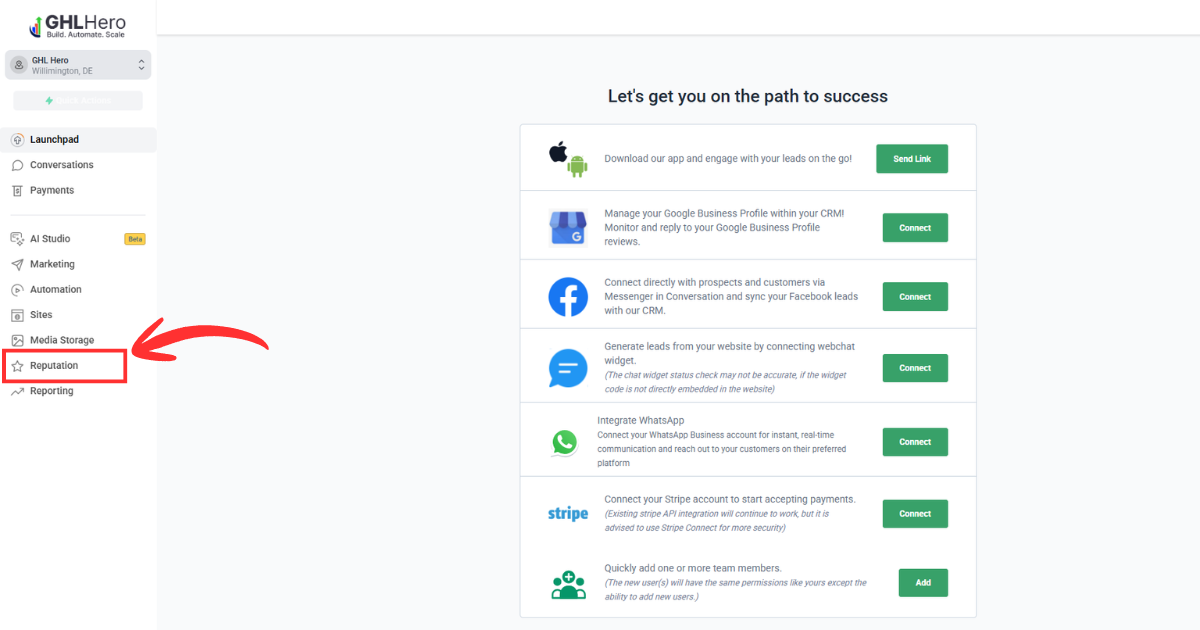
You will find it under:
Reputation → Video Testimonials
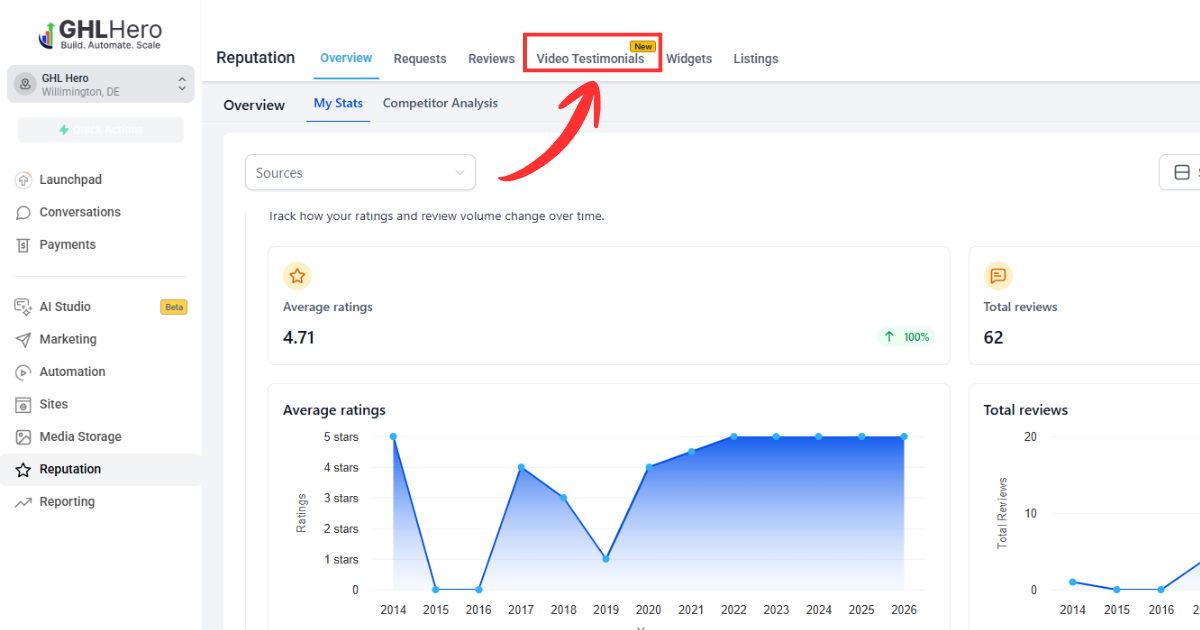
Step 2: Create a Video Testimonial Collector
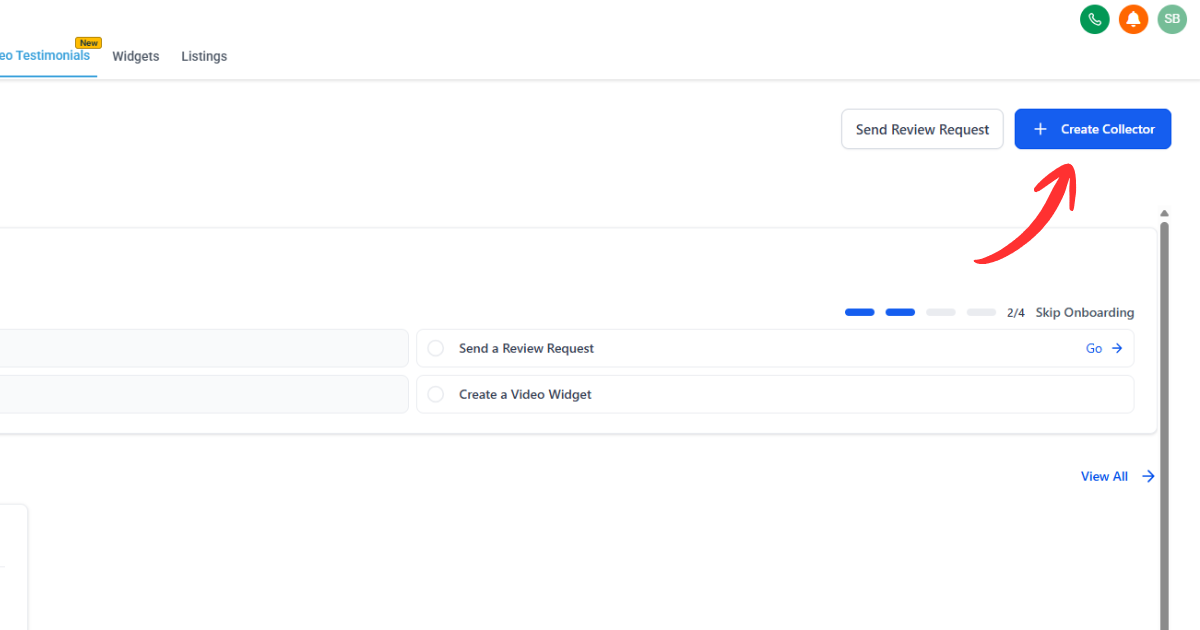
- Open the Video Testimonials section
- Click on Create Collector
- This starts your setup process
Think of this as your testimonial collection funnel
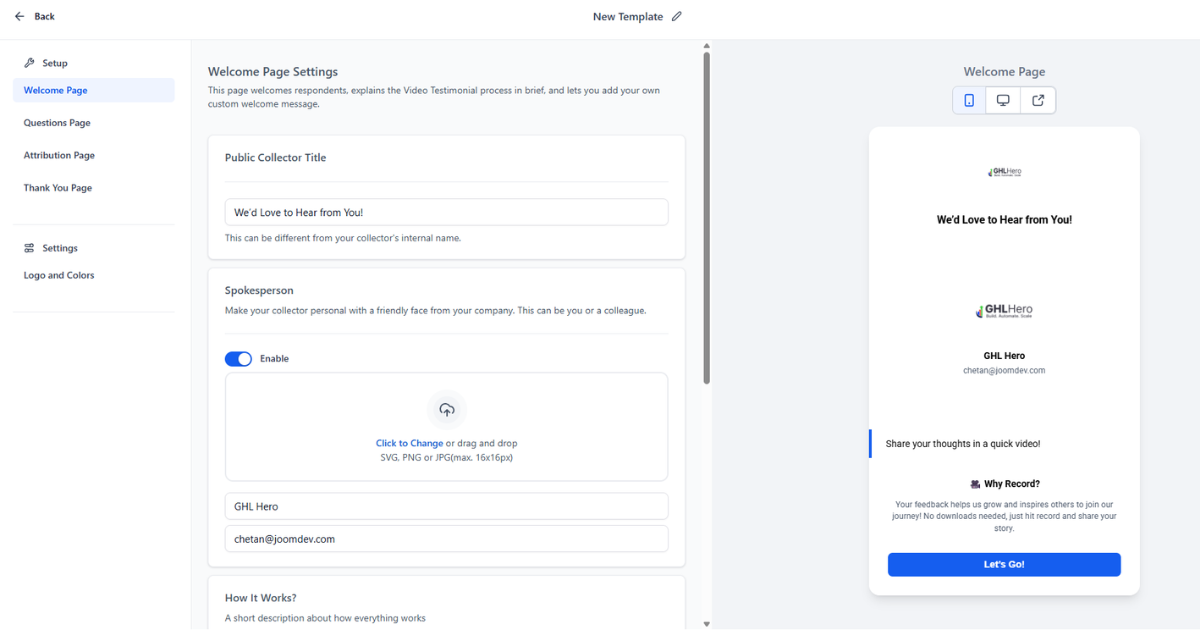
Step 3: Set Up Welcome Page
This is the first impression for your customer.
Include:
- A simple headline
Example: “We would love your feedback” - Add a spokesperson (name + photo)
- Write a short message explaining the process
Keep it:
- Friendly
- Clear
- Easy to understand
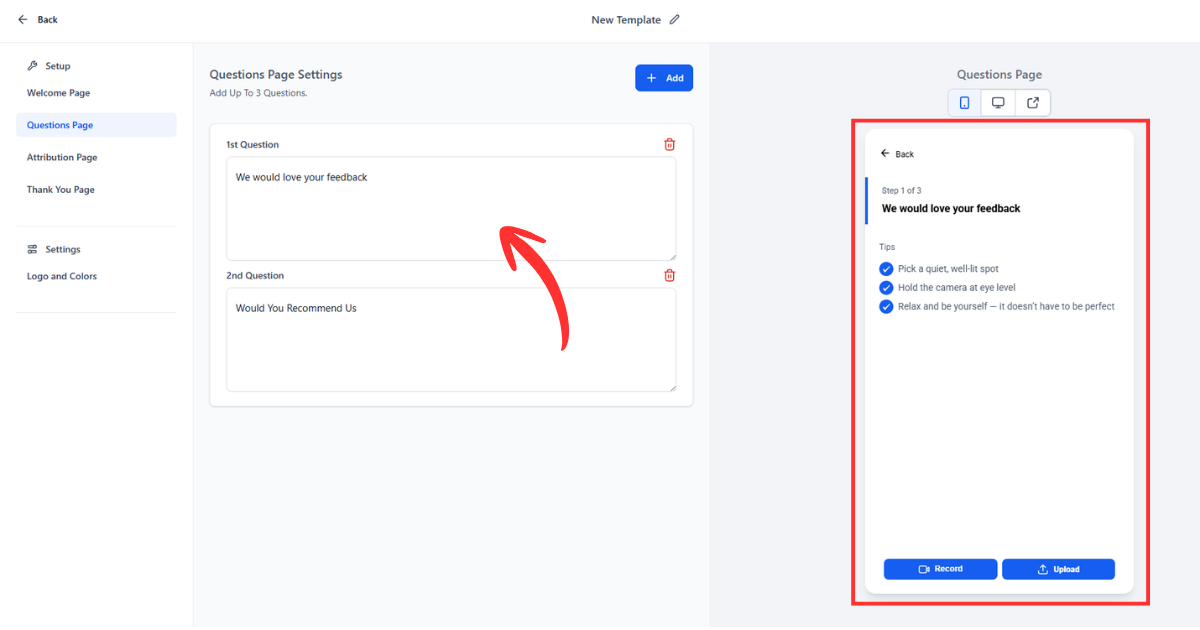
Step 4: Add Testimonial Questions
You can add up to 3 questions.
Use prompts like:
- What problem were you facing before?
- How was your experience with us?
- What results did you get?
Good questions = better testimonials
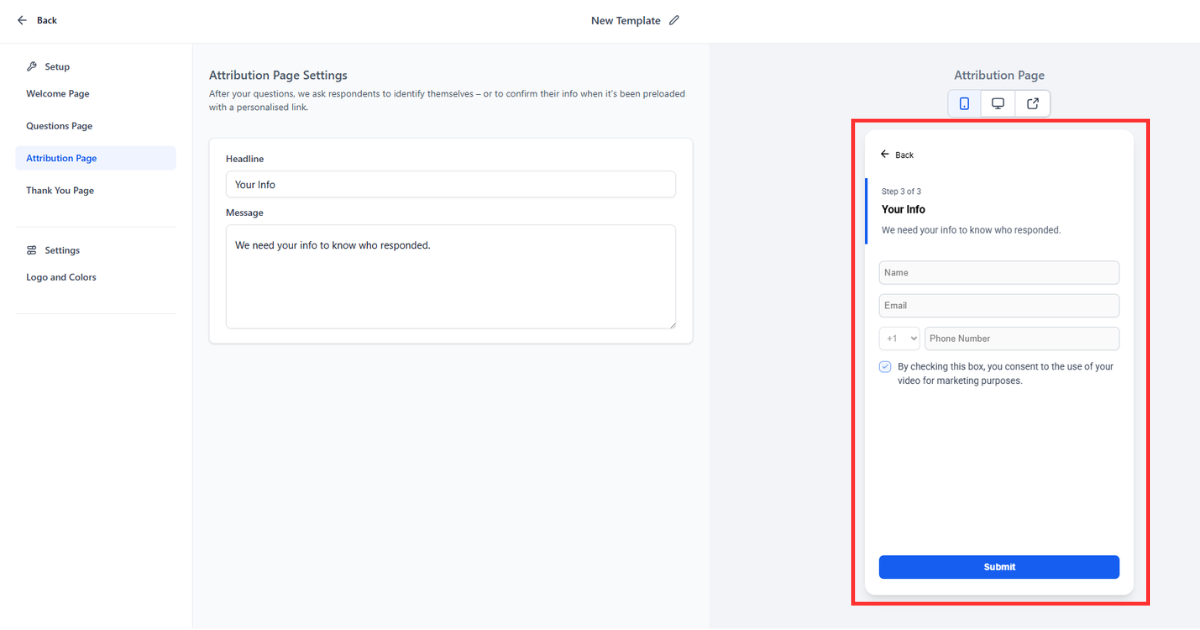
Step 5: Configure Attribution Page
After recording, collect basic details:
- Name
- Phone number
This helps you:
- Identify the customer
- Organize testimonials properly
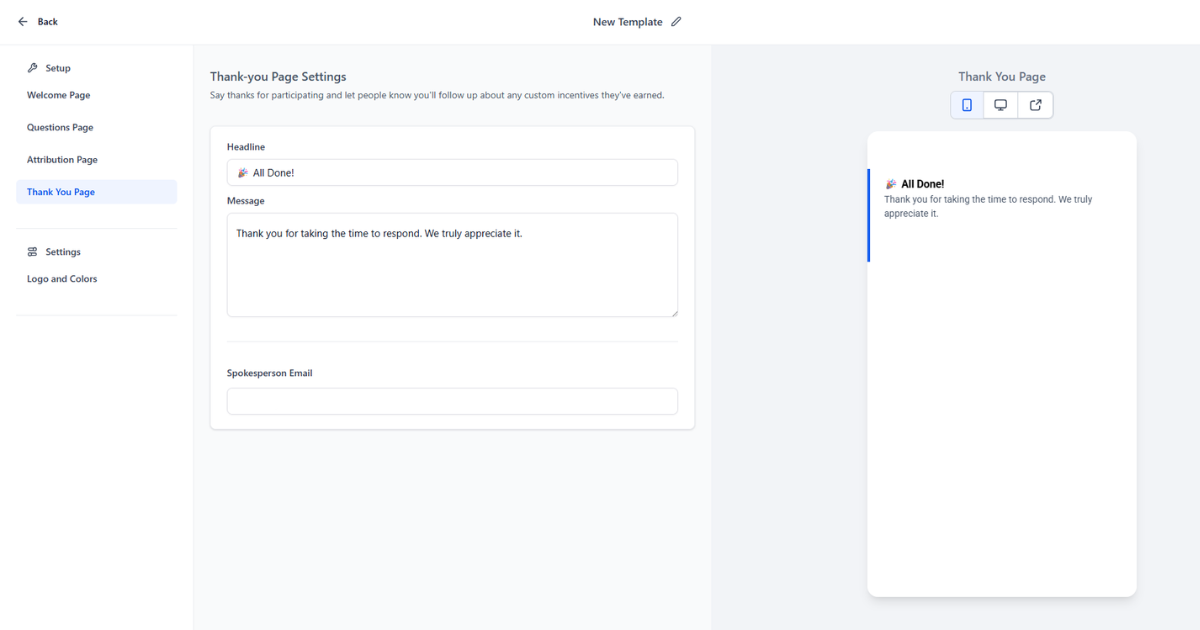
Step 6: Customize Thank You Page
Once the video is submitted:
- Add a thank you message
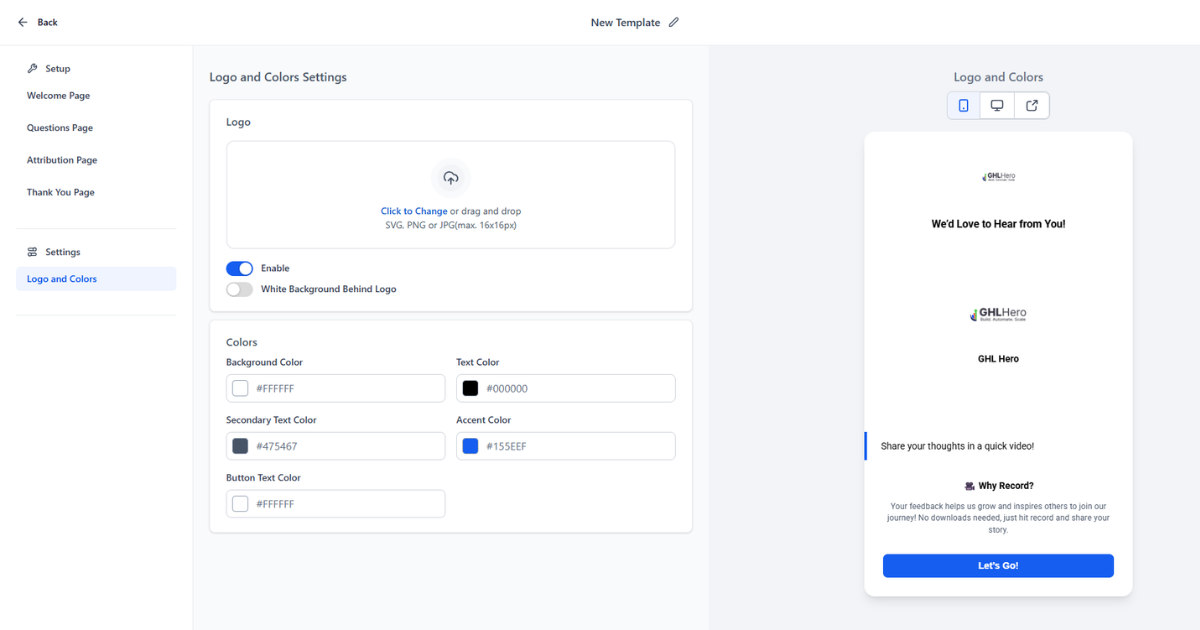
- Use your brand colors
- Include your logo
Example message:
“Thank you for sharing your experience. We really appreciate it.”
Step 7: Send Testimonial Requests
Now it’s time to collect responses.
You can:
- Send the link manually
- Share via email
- Send through SMS
- Add inside workflows (manual workaround)
Important:
Currently, bulk sending is limited, so use the link smartly in your process.
Best Practices to Get High-Quality Video Testimonials
Collecting testimonials is one thing, but getting high-quality videos that actually convert is a different game. These simple practices can make a big difference.
1. Ask at the Right Time
Timing matters a lot.
- Ask when the client has just seen results
- Right after a successful project or milestone
- When they are happy and satisfied
Happy customers give better and more genuine testimonials
2. Keep it Short and Clear
People don’t like recording long videos.
- Ideal length: 30 to 60 seconds
- Short videos are easier to record and watch
- Higher chances of completion
Short and sharp testimonials work best
3. Guide Them with Questions
Most people don’t know what to say.
Give them direction:
- What problem did you face before?
- How did we help you?
- What results did you get?
Clear questions = better storytelling
4. Make the Process Easy
If it feels complicated, people won’t do it.
- No login required
- No downloads
- One-click recording
Tools like GoHighLevel help remove friction completely
5. Use Emotional Prompts
Facts are good, but emotions sell.
Encourage responses like:
- “How did you feel after getting results?”
- “What changed for you?”
Emotion builds trust and connection
Pro Tips to Maximize Results
Once your basic system is ready, these advanced strategies can help you scale testimonial collection and improve response rates.
1. Add Testimonial Requests in Automation
Don’t rely on manual requests.
- Add it to your email workflows
- Include it in SMS follow-ups
- Trigger it after project completion
This creates a consistent flow of testimonials
2. Use It After Onboarding and Offboarding
Best moments to ask:
- After onboarding success
- After project completion
- After delivering results
Capture feedback when experience is fresh
3. Incentivize Responses (Optional)
Sometimes a small push helps.
- Offer discounts
- Give a small reward
- Provide early access or bonus
Keep it simple and ethical
4. Follow Up Twice
Most people don’t respond on the first request.
Best approach:
- First request
- Reminder after 2 to 3 days
- Final follow-up
Follow-ups increase response rate significantly
5. Use Landing Pages for Collection
Instead of random links, create a focused experience.
- Send users to a clean testimonial page
- Remove distractions
- Guide them step by step
A structured flow increases completion rate
How to Showcase Video Testimonials on Your Website
Collecting testimonials is only half the job. The real impact comes when you place them where your audience is already making decisions.
With GoHighLevel, you can use an embed widget to display your video testimonials without downloading or uploading files again and again.
How to Use the Embed Feature
- Copy the testimonial widget code from your dashboard
- Paste it into your website or funnel
- New testimonials update automatically
No manual work every time you get a new video
Where You Should Use Video Testimonials
Landing Pages
- Place them near your call to action
- Helps reduce hesitation before sign-up
Sales Funnels
- Add testimonials before checkout or booking step
- Builds trust at decision stage
Home Page
- Showcase your best testimonials upfront
- Creates strong first impression
Ads and Retargeting
- Use short testimonial clips in ads
- Improves engagement and credibility
Real-World Scenario
Let’s say you run a marketing agency.
A potential client visits your landing page but is unsure. Instead of just reading claims, they see real clients talking about:
- Their problems
- Their experience
- Their results
This instantly builds trust and increases the chances of conversion without extra effort from your side.
Current Limitations of the Feature
No tool is perfect, and it is important to understand the current limitations so you can plan better.
Key Limitations
- No bulk sending option
- You cannot send testimonial requests to multiple contacts at once
- Requests are mostly manual for now
- Limited automation
- No dedicated workflow triggers yet
- You need to use link-based workarounds
What This Means for You
- You may need to manage requests manually in the beginning
- Scaling requires some creative use of workflows
- Future updates will likely improve this
Being aware of limitations helps you set the right expectations
Why GoHighLevel is the Best Tool for Video Testimonials
Even with a few limitations, GoHighLevel stands out as one of the best solutions for collecting and managing video testimonials.
1. Cost Saving
- No need to pay for separate testimonial tools
- Everything is included in one platform
2. All-in-One System
- CRM, funnels, automation, and testimonials in one place
- No need to switch between multiple tools
3. Scalable for Growth
- Works for small businesses and large agencies
- Easy to expand as you grow
4. Easy Management
- All testimonials stored in one dashboard
- No confusion, no scattered files
- Simple to update and showcase
Instead of juggling different tools and processes, you get a clean and simple system that helps you collect, manage, and use testimonials effectively.
That is what makes it a game-changer for businesses focused on growth and conversions.
Conclusion
Collecting video testimonials does not have to be complicated anymore. With GoHighLevel, you can handle everything from collection to management and display in one simple system.
Instead of chasing clients, managing multiple tools, or dealing with manual uploads, you now have a smooth process that works for both you and your customers. This not only saves time but also improves the quality and consistency of testimonials you collect.
Video testimonials help build trust, increase conversions, and show real results from real people. When used correctly, they can become one of your strongest marketing assets.
Even though the feature is still evolving, its current capabilities are already powerful. As more updates and automation features are added, it will become even easier to scale your testimonial strategy.
The sooner you start, the faster you build trust and credibility in your business.
Start Collecting Video Testimonials Today
If you are serious about growing your business and increasing conversions, now is the right time to start using video testimonials.
FAQ
1. How do I collect video testimonials easily?
The easiest way is to use a simple recording link where clients can record directly from their phone or browser. With GoHighLevel, you can send a collector link, and customers can record and submit their testimonial in one step without downloading anything.
2. Can I automate video testimonial requests in GoHighLevel?
Right now, full automation is limited. However, you can still add the testimonial link inside your email or SMS workflows and send it after project completion. This works as a simple workaround until more automation features are added.
3. What is the ideal length for a video testimonial?
The best length is between 30 to 60 seconds. Short videos are easier for customers to record and more engaging for viewers. Focus on clear results and real experience instead of long explanations.
4. What questions should I ask in a video testimonial?
Keep it simple and focused. Good questions include:
- What problem were you facing before?
- How was your experience with us?
- What results did you achieve?
These help customers give natural and useful responses.
5. Where should I use video testimonials for best results?
You should place them where decisions happen:
- Landing pages
- Sales funnels
- Home page
- Ads and retargeting campaigns
This helps build trust at the right moment and improves conversions.